
Trigger: Lead Converted
Last updated August 29, 2026
Fires when a lead becomes a customer, proven by a subscription or a transaction.
This is the trigger that closes the loop. A lead you captured weeks ago has finally bought something, and this connects the two records — the marketing that brought them in and the money that followed.
Before you start: read Triggers for the four-step wizard, the Advanced Options, and how templates and delivery work. This page only covers what is different about this event.
Audience filters
Choose Lead Converted on the event picker and you land on Which conversions.
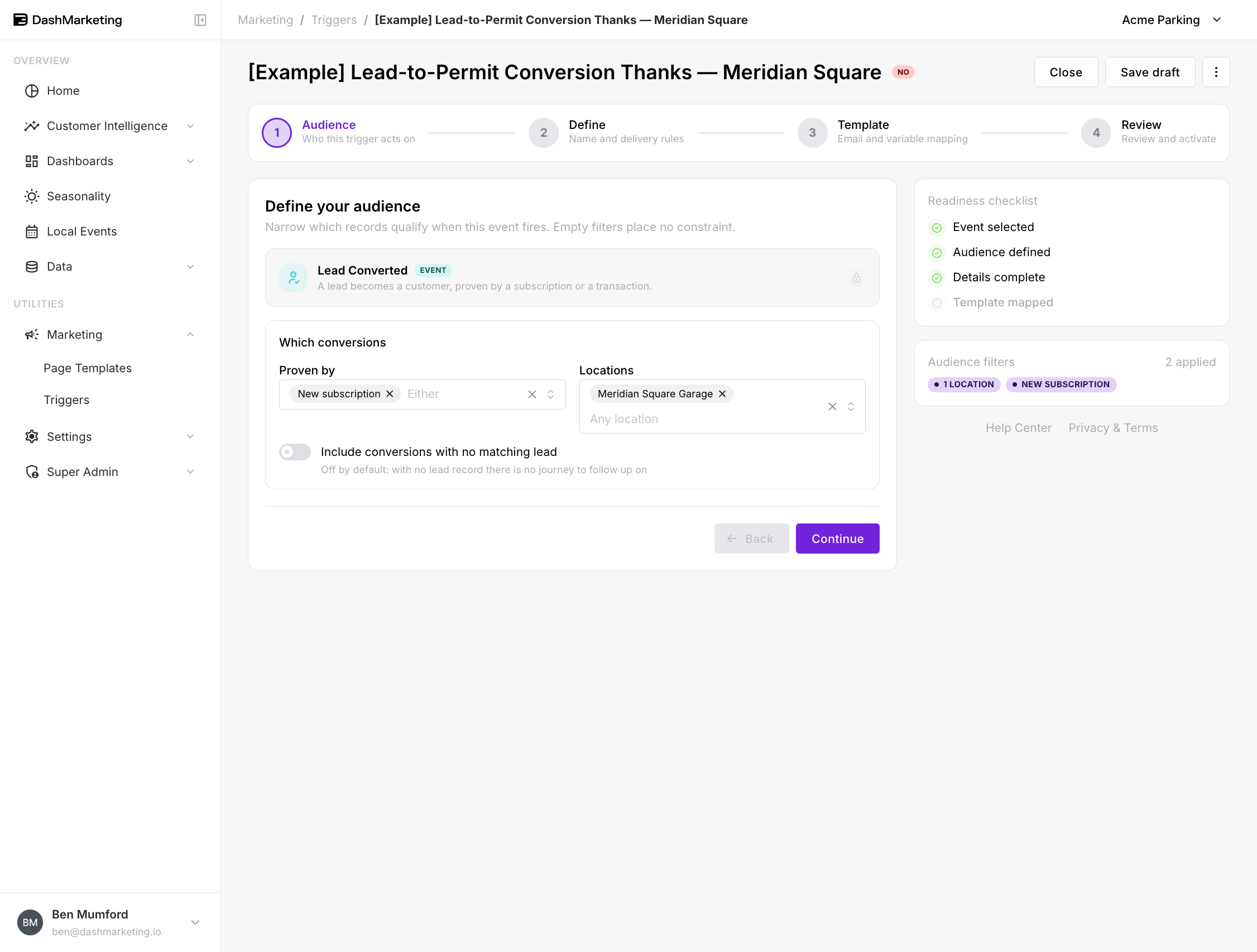 Proven by — what counts as proof of conversion:
New subscription — they bought a monthly permit
First transaction — they paid for parking
Leave it blank and it reads Either — both count.
Locations — restrict to conversions at specific locations.
Include conversions with no matching lead — off by default. The help text explains why: "with no lead record there is no journey to follow up on."
That toggle, in plain terms
With it off, this trigger only fires when the system can match the new customer back to an existing lead record. Someone who walked in off the street and paid, with no prior lead, does not fire it.
That is usually correct. The entire point of a conversion email is that it can reference the journey — you enquired, you asked about rates, now you're a customer. Without a lead record there is no journey, and the email either sounds generic or slightly wrong.
Turn it on only if you are deliberately treating this as "any new customer" rather than "a lead who converted." At that point ask whether First-Time Transaction or New Subscription is the honest event for what you are doing.
Worked example
[Example] Lead-to-Permit Conversion Thanks — Meridian Square — saved in the account as a draft, switched off.
| Setting | Value |
|---|---|
| Event | Lead Converted |
| Proven by | New subscription |
| Locations | Meridian Square Garage |
| Include conversions with no matching lead | Off |
| Trigger Name | [Example] Lead-to-Permit Conversion Thanks — Meridian Square |
| Priority | 0 |
| Stop after this trigger | Off |
| Channel | |
| Recipient | {{EMAIL}} |
| From Email | (default sender) |
| Status | Off |
What it does. Someone who came in as a lead — a QR scan, an enquiry form, a referral — takes out a monthly permit at Meridian Square Garage. They get an email that acknowledges the whole arc, not just the purchase.
Why these settings. Proven by: New subscription keeps this to the meaningful conversion; a single drive-up transaction is a much weaker signal and would dilute the message. The location filter lets the copy be specific about the garage. The no-matching-lead toggle stays off, because a customer with no lead record has no journey for the email to reference.
 ---
---
Things that catch people out
This is the most overlap-prone event in the set. A lead taking out a permit can fire Lead Converted and New Subscription. A lead making their first payment can fire Lead Converted and First-Time Transaction. If you run Lead Converted alongside either, plan the priority order and use Stop after this trigger — otherwise the same customer gets two emails from one action.
"Either" is broader than it sounds. Leaving Proven by blank means a single $4 drive-up transaction converts the lead, same as a monthly permit. If you only care about permits, say so explicitly.
Conversion can happen long after capture. A lead from six months ago converting today still fires this trigger. Make sure the copy does not assume the enquiry was recent.
Test this one before activating. More than any other event, this email depends on the lead-to-customer match being right. Use Simulate & Send Test from the row menu and check what the merged email actually says.
Was this page helpful?