
Trigger: Lead Created
Last updated August 28, 2026
Fires when a lead is captured, from a form or any other source.
Where Form Submission is tied to a specific form, Lead Created sits one level up: it fires on the lead record itself, however that lead arrived. Form fills, QR scans, inside sales entry, imports — all of it.
Before you start: read Triggers for the four-step wizard, the Advanced Options, and how templates and delivery work. This page only covers what is different about this event.
Audience filters
Choose Lead Created on the event picker and you land on Which leads.
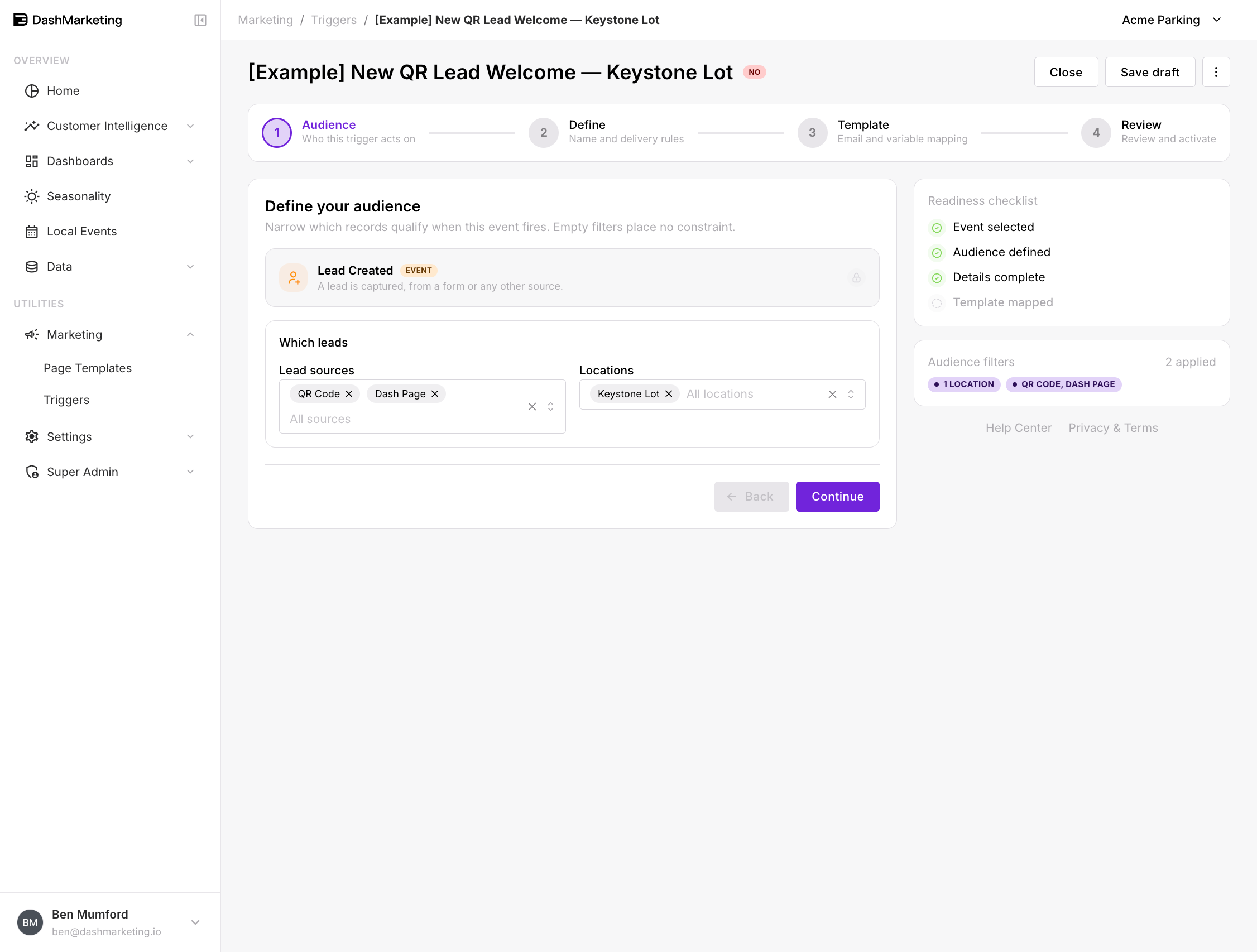 Lead sources — which capture channels this trigger covers.
Available sources:
| QR Code | Website | Referral |
| In-Person | Social Media | Advertisement |
| Dash Page | Dash Form | Inside Sales |
| Campaign | Promotional | Partner Page |
| Other |
Locations — restrict to leads attached to specific locations.
Both are multi-select and both are optional. Leave either blank and it places no constraint — an empty Locations field means every location, not none.
Form Submission or Lead Created?
They overlap, and picking the wrong one is the most common mistake with this event.
Use Form Submission when the content of the email depends on which form they filled in. A monthly parking enquiry and a validation request need different replies.
Use Lead Created when the email is the same regardless of how they arrived. A generic welcome, an introduction to your locations, a "what happens next" — anything where the form is incidental.
Watch for double sends. A lead captured through a DashPages form creates both a form submission and a lead. If you have an active trigger on each, that customer gets two emails. Fix it with priority and Stop after this trigger — put the specific one first and let it stop the chain. See Triggers → Step 2 for how that works.
Worked example
[Example] New QR Lead Welcome — Keystone Lot — saved in the account as a draft, switched off.
| Setting | Value |
|---|---|
| Event | Lead Created |
| Lead sources | QR Code, Dash Page |
| Locations | Keystone Lot |
| Trigger Name | [Example] New QR Lead Welcome — Keystone Lot |
| Priority | 0 |
| Stop after this trigger | Off |
| Channel | |
| Recipient | {{EMAIL}} |
| From Email | (default sender) |
| Status | Off |
What it does. Someone scans a QR code at Keystone Lot, or lands on a Dash Page for it, and gives you their details. They get a welcome email — where the lot is, how to pay, what a monthly permit costs.
Why both sources. QR Code and Dash Page are the two ways a lead arrives at Keystone Lot without a person involved. Including both means the trigger covers the whole self-serve path. Referral and Inside Sales are left out deliberately: those leads have a human attached, and an automated welcome would undercut them.
 ---
---
Things that catch people out
Imported leads count. Bulk-importing a list of leads creates lead records, and an active Lead Created trigger with no source filter will fire on every one of them. Before any import, either deactivate broad Lead Created triggers or make sure your source filter excludes the import path.
A lead is not a customer. This fires on capture, not on conversion. If you want the email that goes out when they actually buy something, use Lead Converted.
Was this page helpful?