
Trigger: New Subscription
Last updated August 29, 2026
Fires when a monthly parking subscription is created — the onboarding moment.
This is the highest-value trigger in the set. Someone has just committed to a recurring payment, and this is the email that tells them how to actually use what they bought.
Before you start: read Triggers for the four-step wizard, the Advanced Options, and how templates and delivery work. This page only covers what is different about this event.
Audience filters
Choose New Subscription on the event picker and you land on Which subscriptions.
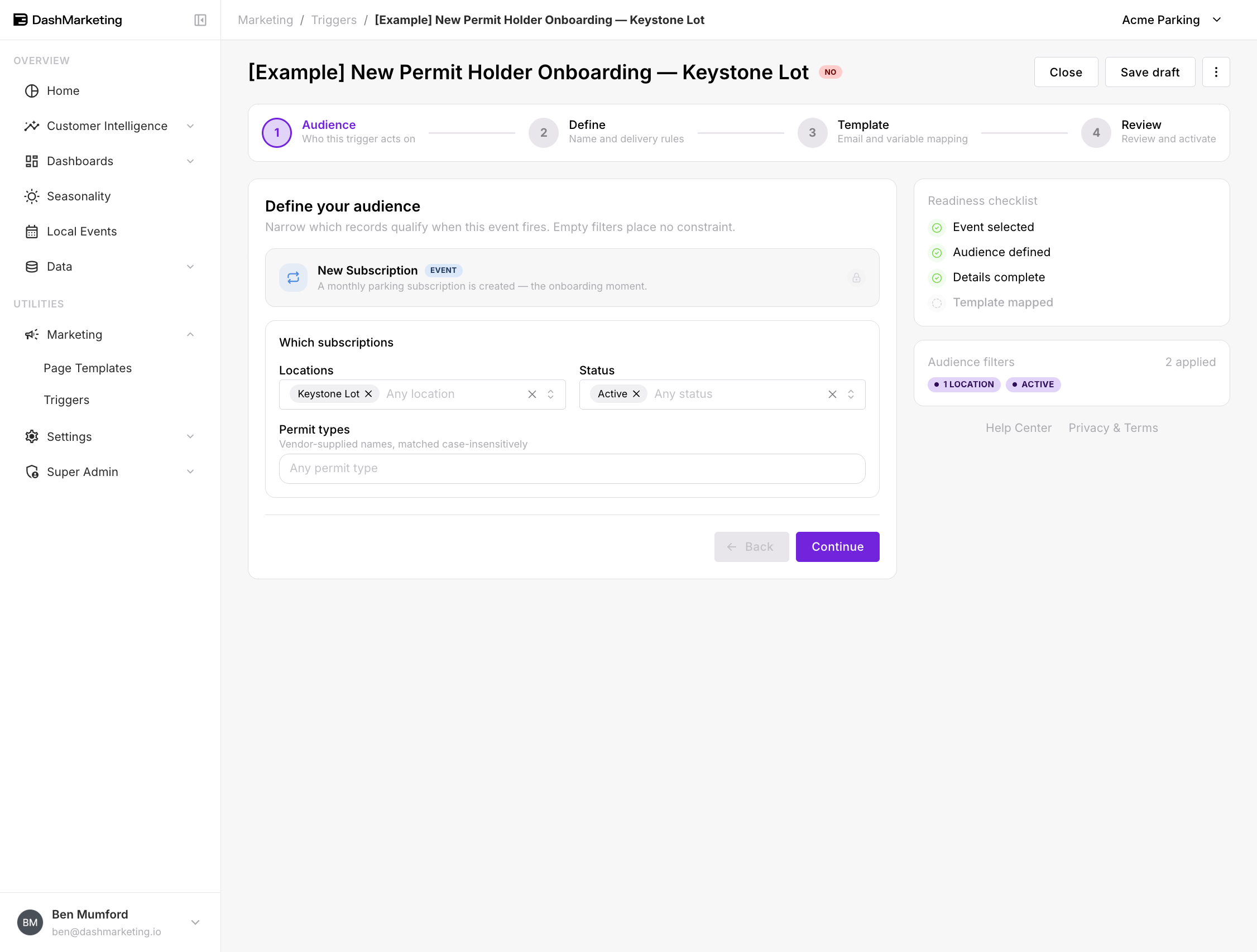 Locations — restrict to subscriptions at specific locations.
Status — the subscription's state at creation:
Active
Pending Approval
Suspended
Cancelled
Expired
Permit types — free text, matched case-insensitively against the vendor-supplied permit names. Because these names come from your parking vendor rather than from Dash, check how they are actually spelled in your data before relying on this filter.
All three are optional.
Why the Status filter matters more than it looks
Leaving Status blank means every new subscription record fires the trigger, whatever state it is in — including ones created as Pending Approval.
At a site where permits need approval, that means sending "welcome, here is your permit" to someone who does not have a permit yet. Filtering to Active is the safer default: it restricts the trigger to subscriptions that are live and usable from the moment they are created.
If your site does use an approval step and you want to acknowledge the application as well, that is a second trigger filtered to Pending Approval, with different copy — "we've received your application" rather than "you're all set."
Worked example
[Example] New Permit Holder Onboarding — Keystone Lot — saved in the account as a draft, switched off.
| Setting | Value |
|---|---|
| Event | New Subscription |
| Locations | Keystone Lot |
| Status | Active |
| Permit types | (none — any) |
| Trigger Name | [Example] New Permit Holder Onboarding — Keystone Lot |
| Priority | 0 |
| Stop after this trigger | Off |
| Channel | |
| Recipient | {{EMAIL}} |
| From Email | (default sender) |
| Status | Off |
What it does. A monthly permit is created at Keystone Lot and is active straight away. The new permit holder gets everything they need on day one: which entrance to use, how their credential works, when they will be billed, and who to call.
Why these settings. Location-specific because the practical detail — gates, entrances, which floor — is location-specific, and a generic version helps nobody. Status filtered to Active so the email only goes to people whose permit actually works. Permit types left blank because every new permit holder at this location needs the same onboarding regardless of tier.
 ---
---
Things that catch people out
Overlap with Lead Converted. A lead who buys a permit fires both this and Lead Converted if that one is set to be proven by a new subscription. Two emails, same moment. Decide which one owns the message and use priority plus Stop after this trigger to suppress the other.
Permit types depends on vendor data. The field matches vendor-supplied names. If your vendor renames a permit tier, a filter that references the old name stops matching without any error.
A renewal is not a new subscription. This fires on creation. Check how renewals are recorded in your data before assuming existing permit holders will not receive it.
Status is the status at creation. A subscription created as Pending Approval and later approved does not re-fire an Active-filtered trigger. If the approval moment is what you want to email on, this event will not give it to you.
Was this page helpful?