
Trigger: Transaction Milestone
Last updated August 26, 2026
Fires when a customer reaches a visit count or spend threshold, optionally within a rolling window.
This is your loyalty trigger. Tenth visit, $500 spent, five visits this quarter — anything where the moment worth marking is cumulative rather than a single event.
Before you start: read Triggers for the four-step wizard, the Advanced Options, and how templates and delivery work. This page only covers what is different about this event.
Audience filters
Choose Transaction Milestone on the event picker. The audience step has two cards.
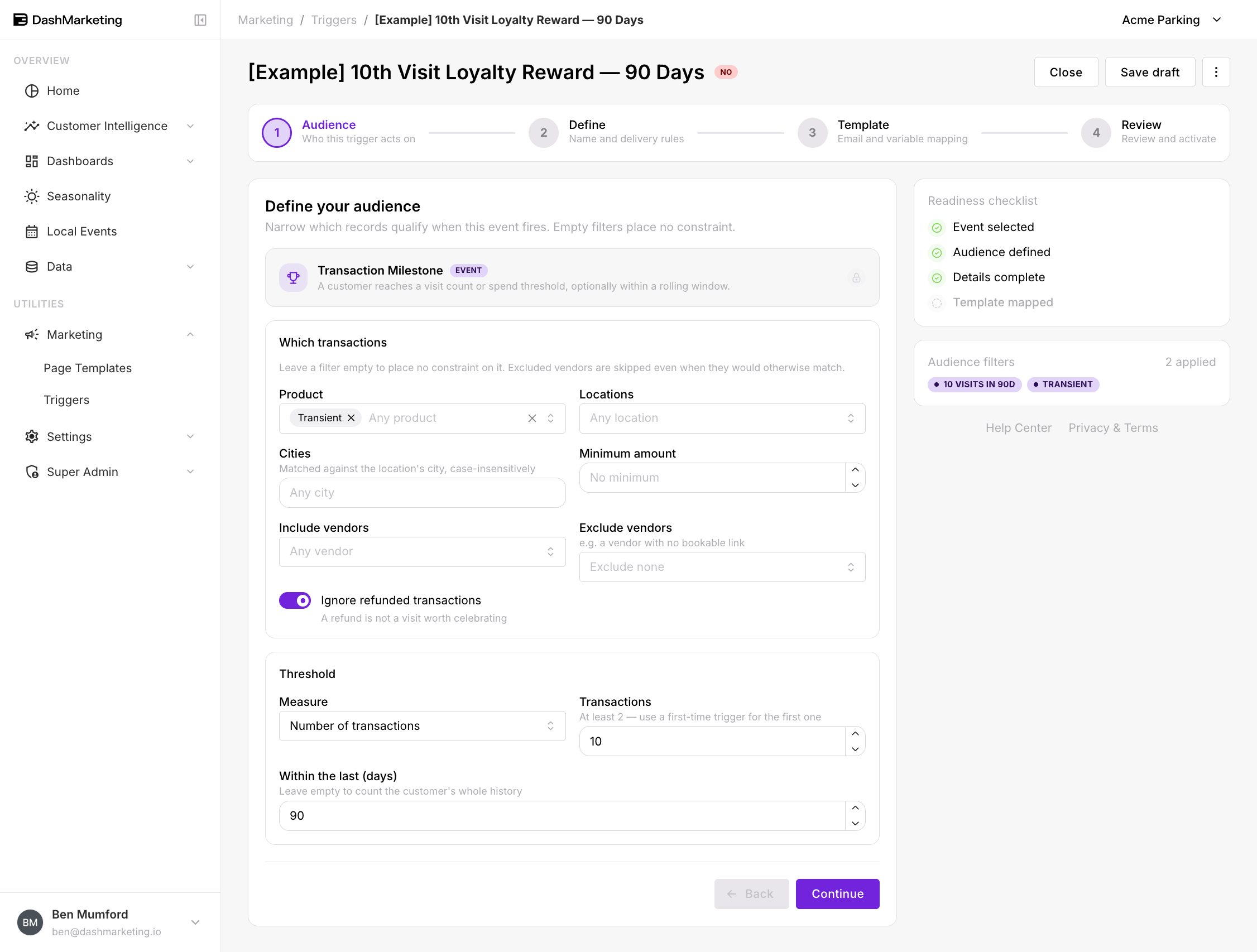 ### Which transactions
Identical to First-Time Transaction: Product, Locations, Cities, Minimum amount, Include vendors, Exclude vendors, and Ignore refunded transactions (on by default).
These filters decide which transactions get counted, not who receives the email. Filter to Transient and only transient transactions count toward the threshold.
Threshold
Measure — what you are counting:
Number of transactions — visit count
Total spend — dollars
Transactions (or the spend target, depending on Measure) — the threshold value. Minimum 2; the field itself tells you "At least 2 — use a first-time trigger for the first one." Defaults to 5.
Within the last (days) — a rolling window. Leave it empty to count the customer's whole history.
Rolling window or all time?
This choice changes what the trigger means.
All time (leave the window empty) marks a lifetime achievement. Their tenth visit ever, whether that took a month or three years. Each customer hits it once and never again.
Rolling window measures current behaviour. "Ten visits in the last 90 days" identifies someone who is a regular right now. It is a much better signal for a monthly permit pitch — and because the window rolls, a customer can qualify, lapse, and qualify again later.
Ten visits all-time tells you someone used your garage ten times. Ten visits in 90 days tells you they are commuting.
Worked example
[Example] 10th Visit Loyalty Reward — 90 Days — saved in the account as a draft, switched off.
| Setting | Value |
|---|---|
| Event | Transaction Milestone |
| Product | Transient |
| Locations | (none — any) |
| Minimum amount | (none) |
| Exclude vendors | (none) |
| Ignore refunded transactions | On |
| Measure | Number of transactions |
| Transactions | 10 |
| Within the last (days) | 90 |
| Trigger Name | [Example] 10th Visit Loyalty Reward — 90 Days |
| Priority | 0 |
| Stop after this trigger | Off |
| Channel | |
| Recipient | {{EMAIL}} |
| From Email | (default sender) |
| Status | Off |
What it does. A drive-up customer reaches their tenth transient transaction inside a rolling 90-day window. They get an email that does the arithmetic for them: ten visits at the drive-up rate versus one monthly permit.
Why these numbers. Ten visits in ninety days is roughly weekly parking — a commuter paying transient rates, which is the clearest monthly-permit prospect you have. Transient-only matters because existing permit holders have no reason to be counted. Locations is deliberately blank: the pitch works wherever they park.
 ---
---
Things that catch people out
The threshold cannot be 1. Use First-Time Transaction for the first visit — the field says as much.
Filters shape the count, not just the audience. Filtering to a single location means only that location's visits count toward the threshold. A customer with five visits at each of two locations never hits a ten-visit, single-location trigger.
"Ignore refunded" changes the arithmetic. With it on, a refunded transaction is not counted toward the threshold at all. That is almost always what you want, but it means a customer's count can differ from the number of transactions they see on their own statement.
Multiple thresholds need multiple triggers. There is no way to build a ladder — 5th, 10th and 25th visit are three separate triggers. Give them distinct priorities and consider Stop after this trigger so a customer crossing two thresholds at once does not get both emails.
Was this page helpful?