
Managing Location Attributes
Last updated August 27, 2026
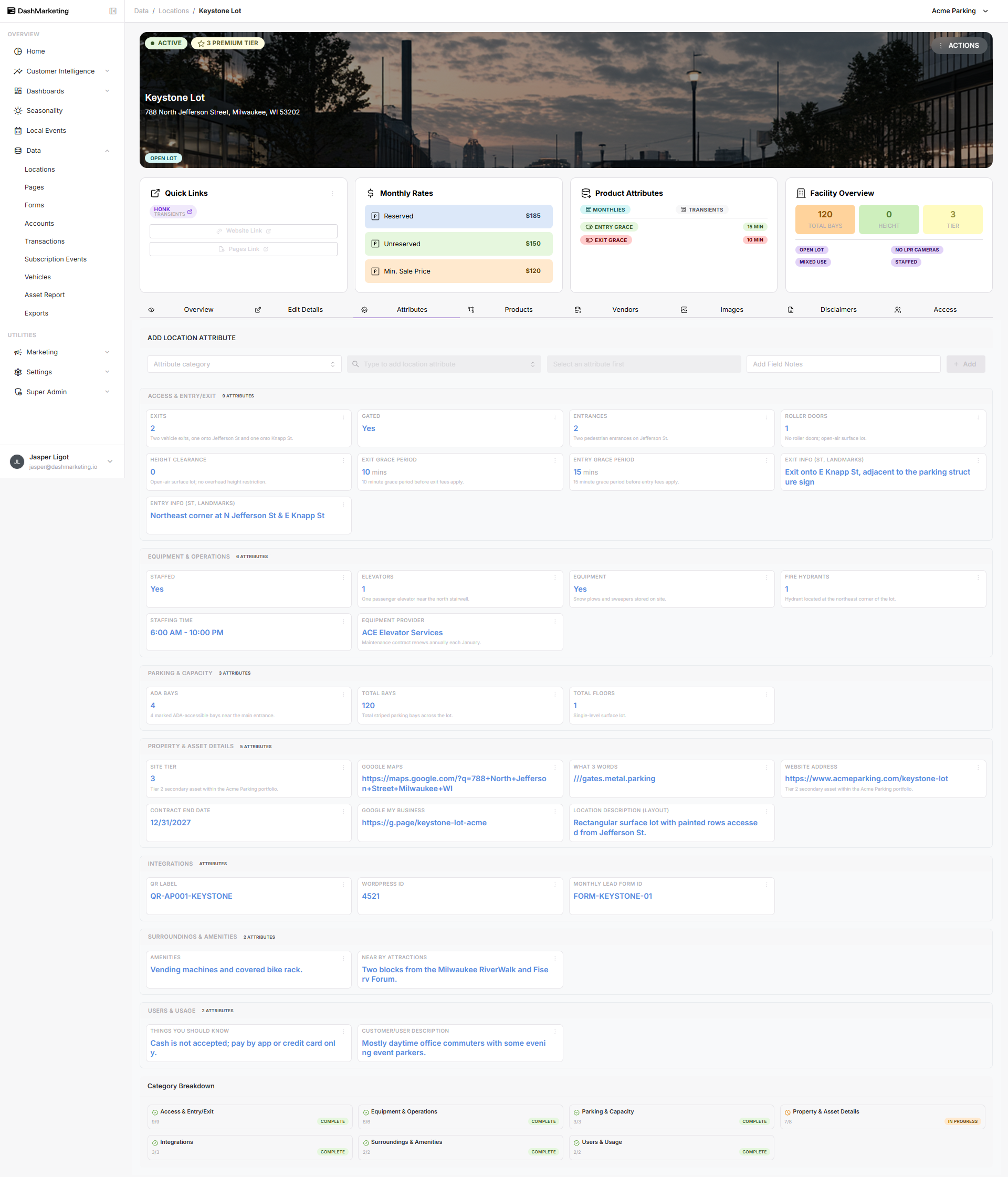
locationThis guide covers the Attributes tab, where facility-level details are organized into categories. These values feed the badges and widgets shown on the Overview tab (Facility Overview, Product Attributes, etc.).
How it works
Attributes are grouped into categories, each shown as its own card. Click into a field to edit it inline — most fields save automatically on selection, so there is no single "Save" button for this tab.
Categories filled in on Keystone Lot (worked example)
Access & Entry/Exit (9/9)
Entrances, Exits, Gated status, Height clearance, Roller doors, Entry Info / Exit Info (driver-facing directions), and Entry/Exit Grace Period — these grace periods feed the Overview tab badges.
Equipment & Operations (6/6)
Elevators, Fire Hydrants, on-site Equipment (with a provider note), Staffed status, and Staffing Time.
Parking & Capacity (3/3)
Total Bays, Total Floors, and ADA Bays. Total Bays feeds the Facility Overview widget on the Overview tab.
Property & Asset Details (7/8)
Location Description, Website Address, Google My Business and Google Maps links, What 3 Words, Contract End Date, and Site Tier (drives the "Premium Tier" badge on the header banner). Asset Type could not be saved — see Known issue below.
Integrations (3/3)
Monthly Lead Form ID, QR Label, and Wordpress ID — identifiers used to connect the location to external marketing and lead-capture tools.
Surroundings & Amenities (2/2)
Free-text fields for on-site Amenities and nearby attractions, useful for marketing copy and parker-facing pages.
Users & Usage (2/2)
"Things you should know" and a Customer/User Description — short notes describing who uses the location and any need-to-know policies (e.g. payment restrictions).
Known issue
The "Asset Type" attribute in Property & Asset Details repeatedly failed to save during testing (29 of 30 attributes were saved successfully). If you hit the same issue, try re-selecting the value or contact support.
Was this page helpful?