
How Lead Conversions Are Calculated
Last updated October 22, 2026
How Lead Conversions Are Calculated
The Leads dashboard shows how many leads have become paying customers. Dash identifies these conversions by matching a parking transaction or subscription to an existing lead, then checking your organization’s Lead Conversion settings.
This guide explains what counts as a conversion and how your settings affect the results. For an overview of the dashboard’s charts and filters, see Leads.
Understanding the numbers
A converted lead is a lead record that Dash has matched to a qualifying parking transaction or subscription.
The conversion total counts converted lead records. It does not count payments or subscriptions. A customer making another payment does not convert the same lead again.
A purchase alone is not enough: there must be a matching lead in Dash.
Conversion rate
The conversion rate expresses converted leads as a percentage of total leads:
Conversion rate = Converted leads ÷ Total leads × 100
For example, the dashboard shown below has 24 leads and 5 converted leads:
5 ÷ 24 × 100 = 20.8%
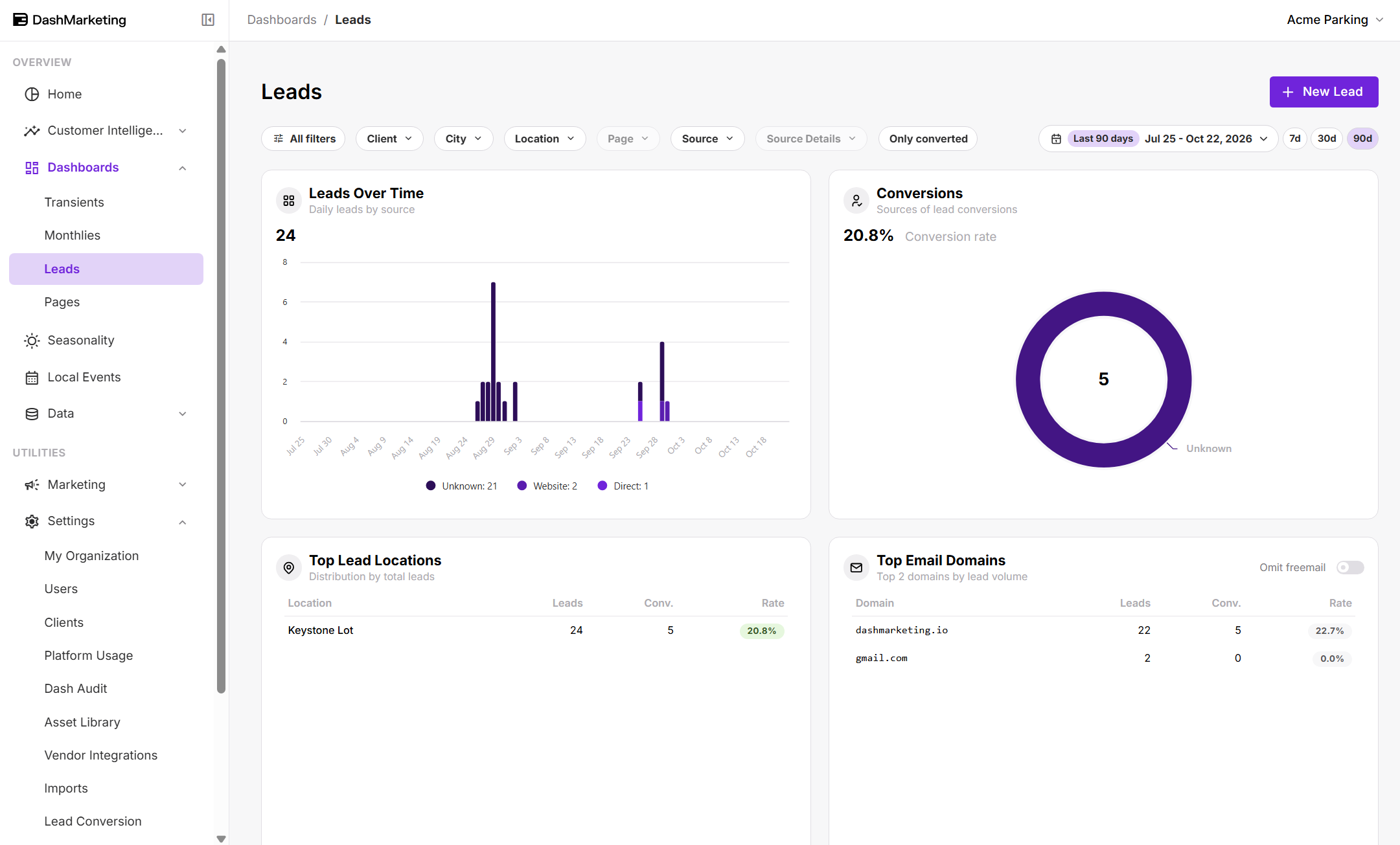 The Conversions chart also breaks down converted leads by their lead source. The Conv. and Rate columns in the location and email-domain tables show conversion counts and rates for each group.
Check the active dashboard filters when comparing results. The Only converted filter restricts the view to converted leads; leave it off when reviewing converted and unconverted leads together.
How a lead converts
Dash checks for conversions every 10 minutes. A purchase may not appear as a conversion immediately, and its transaction or subscription must first be available in Dash.
For a lead to convert, it must meet these conditions:
The purchase type is enabled. Your organization chooses which parking products can convert leads.
The buyer matches an existing, unresolved lead. Dash matches by email, or by phone when phone matching is enabled.
The lead passes your eligibility filters. Source exclusions and other rules can prevent a matching lead from converting.
The timing qualifies. A lead created after the purchase must fall within the configured grace period.
The location qualifies. Location settings determine whether a purchase at a different location can convert the lead.
How Dash matches the buyer
| Match method | How it works |
|---|---|
| The buyer’s email matches the lead’s email. Capitalization does not matter. | |
| Phone | When enabled, Dash compares the last 10 digits of the buyer’s and lead’s phone numbers. Recognized placeholder or invalid numbers are ignored. |
Either match is sufficient; both are not required. The lead must still meet the remaining conversion conditions.
For example, someone submits a monthly parking inquiry using a personal email address, then purchases parking using a work email address. If both records have the same phone number and phone matching is enabled, Dash can match the purchase to the lead.
Shared phone numbers can also match different people. Keep this in mind if several customers use the same household or business number.
Lead Conversion settings
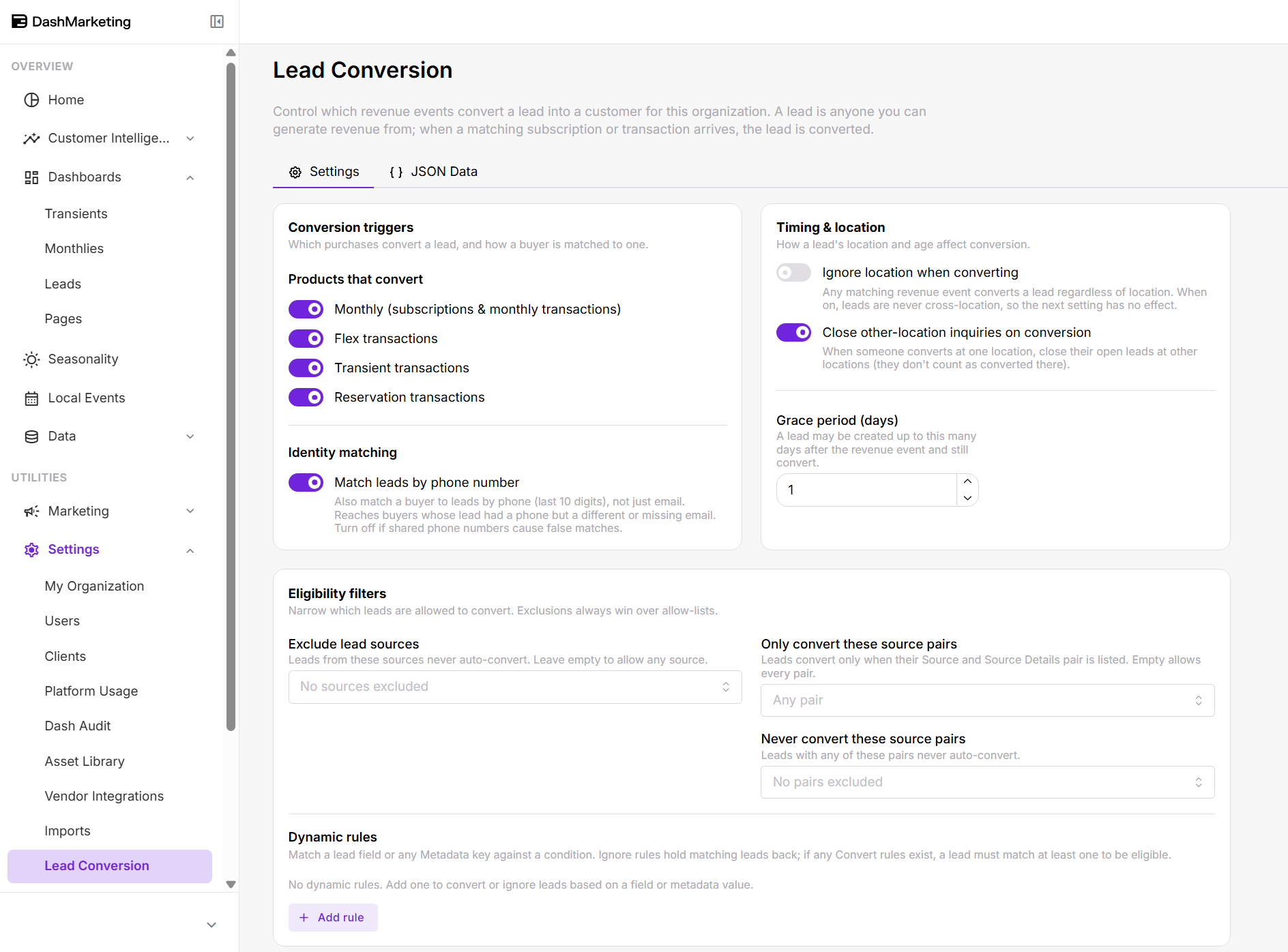 Open Settings → Lead Conversion to review your organization’s rules.
These settings determine which matching leads are eligible to convert. They apply to your organization, while dashboard filters control which results you are viewing.
How settings changes affect existing leads
When you change Lead Conversion settings, Dash reviews the past 30 days using the updated rules. Previously unconverted leads that are still open may qualify for conversion.
Changes do not undo existing conversions or reopen closed leads. The updated rules therefore do not recalculate all historical results.
Conversion triggers
Under Products that convert, choose which purchases can convert a lead.
| Setting | What qualifies when enabled |
|---|---|
| Monthly (subscriptions & monthly transactions) | A monthly parking subscription or monthly transaction. |
| Flex transactions | A flex parking transaction. |
| Transient transactions | A transient parking transaction. |
| Reservation transactions | A reservation parking transaction. |
For example, if Monthly is enabled and Transient transactions is disabled, a matching monthly purchase can convert a lead. A transient purchase cannot.
An enabled product still has to satisfy the matching, eligibility, timing, and location rules.
Identity matching
Match leads by phone number adds phone matching alongside email matching.
Enable it to match leads whose purchase uses a different email address, or whose lead record has a phone number but no email. Disable it if shared phone numbers are causing incorrect matches.
When a phone match converts a lead—or closes it because the purchase was at another location—Dash also adds the lead’s email to the buyer’s contact profile if it differs from the buyer’s email.
Timing & location
| Setting | How it affects conversions | |
|---|---|---|
| Ignore location when converting | Allows a qualifying purchase to convert a matching lead regardless of location. | |
| Close other-location inquiries on conversion | When enabled and location matching applies, matching leads at other locations are closed and do not count as conversions. When disabled, matching eligible leads at other locations also convert. | |
| Grace period (days) | Allows a lead to be created up to this many days after the purchase and still qualify for conversion. |
Purchases at another location
One customer can have separate leads at several locations. Your location settings determine how those leads are counted when the customer purchases parking.
For example, someone submits a lead form at Location A, Location B, and Location C, then purchases parking at Location A:
| Settings | Result |
|---|---|
| Ignore location when converting is enabled | All three eligible leads convert, regardless of the purchase location. The other-location closure setting has no effect. |
| Ignore location when converting is disabled and Close other-location inquiries on conversion is enabled | The Location A lead converts. The leads at Locations B and C are closed and do not count as conversions. |
| Both settings are disabled | All three eligible leads convert. The leads at Locations B and C are not closed. |
With other-location closure disabled, this example produces 3 converted leads from 3 lead form submissions, even though only one person purchased parking. With closure enabled and location matching applied, it produces 1 converted lead from 3 lead form submissions.
Each lead must still meet the applicable identity-matching, product, timing, and eligibility requirements.
What the grace period means
The grace period allows for a lead to arrive in Dash after the purchase.
For example, with a 7-day grace period, a lead created 3 days after a qualifying purchase can still convert. A lead created 8 days afterward falls outside that allowance.
The grace period is not a deadline requiring someone to buy parking within 7 days of becoming a lead. It applies in the other direction: how long after the purchase the lead may be created.
Eligibility filters
Eligibility filters narrow which leads can automatically convert.
| Setting | How it affects conversions |
|---|---|
| Exclude lead sources | Prevents leads from the selected sources from automatically converting. Leave empty to exclude no sources through this setting. |
| Only convert these source pairs | Allows only the listed combinations of Source and Source Details. Leave empty to allow any combination through this setting. |
| Never convert these source pairs | Prevents leads with any listed Source and Source Details combination from automatically converting. |
A source pair combines a lead’s source with its more specific source detail. This lets you distinguish between leads from the same source.
Exclusions always take priority. If a lead matches both an allowed pair and an exclusion, it does not convert. Leads blocked by eligibility filters are also not closed by the other-location closure rule.
Dynamic rules
Dynamic rules provide additional filtering based on a lead field or other information stored with the lead, such as a campaign name or custom form response.
Each rule checks a field against a condition and applies one of two actions:
| Action | Effect |
|---|---|
| Ignore | Prevents matching leads from automatically converting. |
| Convert | Makes matching leads eligible, subject to all other conversion requirements. |
Conditions can check whether a value equals, contains, starts with, or ends with specified text; belongs to a list; is empty; or matches an advanced text pattern. Text comparisons are case-insensitive.
If any Convert rules exist, a lead must match at least one. A matching Ignore rule always takes priority.
For example, an Ignore rule could exclude leads whose campaign field contains “test.” Those leads would remain excluded even if they matched a Convert rule.
A Convert rule does not create a conversion by itself. The lead still needs a qualifying purchase, an identity match, and the required timing and location conditions.
Rules for Source and Source Details use the stored values, which may differ from the labels displayed in Dash.
Why a conversion may be missing
If a purchase has not produced the conversion you expected, check the following:
| Check | What to look for |
|---|---|
| Existing lead | The buyer must have a lead in Dash. A customer profile or purchase alone does not count. |
| Matching details | Email addresses must match, or phone matching must be enabled and the last 10 digits must match. |
| Purchase type | The relevant product must be enabled under Products that convert. |
| Eligibility | Source exclusions, source-pair filters, or dynamic rules may prevent conversion. |
| Timing | A lead created after the purchase must fall within the grace period. |
| Location | A purchase at another location may close the lead or leave it open instead of converting it. |
| Processing | The transaction or subscription must be available in Dash and processed by a conversion check. |
| Dashboard filters | The lead may fall outside the view you are currently reviewing. |
A lead closed because of a purchase at another location does not increase the converted-lead total. Likewise, identifying a buyer as someone who previously had a lead does not, by itself, count as a conversion.
Was this page helpful?